







348 字
1 分钟
Anzhiyu_Flink_Encrypt

Anzhiyu_Flink_Encrypt - 基于anzhiyu主题实现友链页面加密功能
前言: 为了反社工侦察,博主独创的友链加密功能,以防信息搜集者通过你的博客定位到你朋友的博客(bushi
(其实只是一个形式了)
ps:本站友链密码:Q3liZXJTZWN1cml0eUAxMTQ1MTQ=你不是来社工的对吧!👀
v1.1
更新内容: 添加控制加密功能,可在_config.yml文件中设置encrypted_friends的参数来控制网站是否启用友链加密功能
- includes/page/flink.pug
//- includes/page/flink.pug
//- 检查是否开启友链加密功能//- 逻辑:当 encrypted_friends 为 false 时关闭加密,否则需要 page.password 才加密- const encrypted_friends_setting = theme.encrypted_friends- const enableEncryption = encrypted_friends_setting !== false && page.password
if enableEncryption #hexo-blog-encrypt .hbe-input-container input(type="password" id="hbePass" placeholder=page.message || "请输入密码查看友链") button(onclick="decryptFriends()") 解密查看 #hbeError(style="display:none;color:red;margin-top:10px;")= page.wrong_pass_message || '密码错误!'
#encrypted-content(style="display:none;") #article-container // 友链展示内容(略)else //- 非加密模式:直接显示内容 #article-container // 正常友链展示内容(略)
//- 只在启用加密功能时才加载JavaScriptif enableEncryption script. // 页面加载时立即检查加密状态 document.addEventListener('DOMContentLoaded', function() { const encryptedContent = document.getElementById('encrypted-content'); const encryptContainer = document.getElementById('hexo-blog-encrypt');
// 强制显示加密界面,隐藏内容 if (encryptContainer) encryptContainer.style.display = 'block'; if (encryptedContent) encryptedContent.style.display = 'none';
// 检查保存的密码 const savedPass = localStorage.getItem('friends-page-pass'); const correctPass = '#{page.password}';
if (savedPass === correctPass) { if (encryptedContent) encryptedContent.style.display = 'block'; if (encryptContainer) encryptContainer.style.display = 'none'; } else { localStorage.removeItem('friends-page-pass'); if (encryptedContent) encryptedContent.style.display = 'none'; if (encryptContainer) encryptContainer.style.display = 'block'; } });
function decryptFriends() { const inputPass = document.getElementById('hbePass').value; const correctPass = '#{page.password}'; const encryptedContent = document.getElementById('encrypted-content'); const errorElement = document.getElementById('hbeError'); const encryptContainer = document.getElementById('hexo-blog-encrypt');
if (inputPass === correctPass) { encryptedContent.style.display = 'block'; encryptContainer.style.display = 'none'; errorElement.style.display = 'none'; localStorage.setItem('friends-page-pass', inputPass); } else { errorElement.style.display = 'block'; localStorage.removeItem('friends-page-pass'); } }控制器配置:
在站点配置文件或主题配置文件中添加:
encrypted_friends: false 或 encrypted_friends: true
之后进行hexo三连。
v1.0
效果图
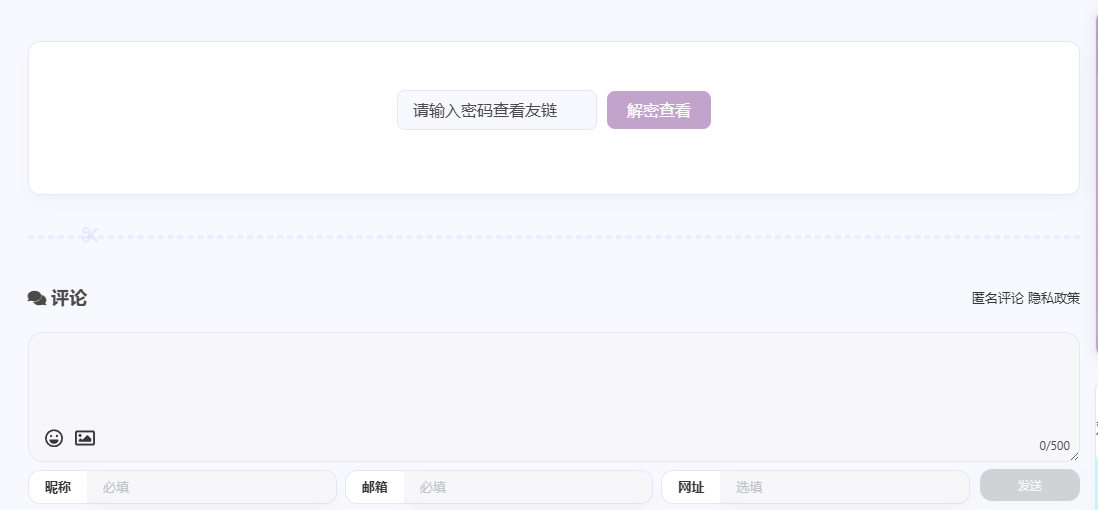
部署教程
前置:
部署好你的博客(本站使用的是基于hexo框架anzhiyu主题的部署)且配置好anzhiyu独有的友链页面。
步骤:
- 找到
\themes\anzhiyu\layout\includes\page\flink.pug文件,将其替换为指定内容(略,见上述代码)。 - 在你创建友链页面而生成的
\source\link\index.md文件的Front-matter部分,添加以下参数:
password: your_password # 设置你的访问密码message: 请输入密码查看友链wrong_pass_message: 密码错误,请重试!abstract: 这里是加密的友链页面,只有知道密码的朋友才能看到哦~- 创建CSS样式并引入配置文件进行美化:
/* 加密界面样式 */#hexo-blog-encrypt { background: var(--anzhiyu-card-bg); border: var(--style-border); border-radius: 12px; padding: 3rem 2rem; margin: 2rem 0; box-shadow: var(--anzhiyu-shadow-border); text-align: center;}
.hbe-input-container { margin-bottom: 1rem;}
#hbePass { padding: 10px 15px; border: var(--style-border); border-radius: 8px; width: 200px; margin-right: 10px; background: var(--anzhiyu-background); color: var(--anzhiyu-fontcolor);}
#hexo-blog-encrypt button { padding: 10px 20px; background: var(--anzhiyu-theme); color: var(--anzhiyu-white); border: none; border-radius: 8px; cursor: pointer; transition: all 0.3s;}
#hexo-blog-encrypt button:hover { background: var(--anzhiyu-theme); transform: translateY(-2px); box-shadow: var(--anzhiyu-shadow-theme);}完成后进行hexo三连即可应用。
附: 该功能初步实现,如有隐藏bug或安全漏洞请联系,感激不尽 注: 本功能与文章加密插件不兼容
分享
如果这篇文章对你有帮助,欢迎分享给更多人!
Anzhiyu_Flink_Encrypt
http://czxh.top/posts/anzhiyuflinkencrypt/ 部分信息可能已经过时
相关文章 智能推荐